



Resolume Arena 7.24 — Lifetime Licence | Sofryx
Original price was: $300.00.$15.00Current price is: $15.00.
Buy Resolume Arena 7.24.3 genuine lifetime licence. Professional VJ software with projection mapping and multi-projector blending. Personally tested. Instant delivery.
Resolume Arena 7.24.3 — Professional VJ Software with Projection Mapping and Live Visual Performance
Resolume Arena 7.24.3 is the professional VJ and visual performance software used by live visual artists, projection mapping specialists, and event producers worldwide for creating and performing stunning real-time visuals at concerts, festivals, nightclubs, theatrical productions, and corporate events. Arena includes everything found in Resolume Avenue plus advanced capabilities for projection mapping onto complex surfaces, blending multiple projectors into seamless panoramic displays, controlling visuals from lighting desks via DMX, and synchronizing performances to DJ sets via SMPTE timecode. Whether you are a VJ performing live at a music festival, a projection artist mapping visuals onto buildings, or an event designer creating immersive experiences, Resolume Arena provides the complete toolkit for professional visual performance. Every licence on Sofryx is personally tested by Mani.
Key Features of Resolume Arena 7.24.3
- Projection Mapping: Map video content onto complex 3D surfaces, architectural facades, stage elements, and irregular objects with advanced warping and masking tools.
- Multi-Projector Blending: Seamlessly blend the output of multiple projectors into unified panoramic displays with automatic edge blending and geometric correction.
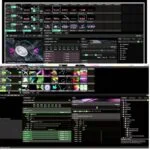
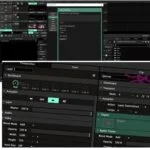
- Real-Time Visual Performance: Mix, blend, and trigger video clips, generative visuals, and effects in real time with layer-based compositing and instant response.
- SMPTE Timecode Sync: Synchronize visual performances to DJ sets, music tracks, and lighting sequences using industry-standard SMPTE timecode for frame-accurate timing.
- DMX and ArtNet Control: Receive control signals from professional lighting desks via DMX and ArtNet protocols for integrated lighting and visual management.
- Color Animation Tools: Eye dropper sampling, color palette animation, and advanced color manipulation for creating dynamic, evolving visual compositions.
- Autopilot and Random Playback: Automated clip triggering with random playback modes, autopilot loops, and MetaBalls, sine wave, and spiral generative effects.
- Unlimited Undo: Experiment freely with visual designs knowing that every change can be reversed instantly with the comprehensive undo system.
Why Buy From Sofryx
- Personally tested by Mani before every listing goes live
- Genuine manufacturer-issued licence — not cracked, not trial
- One-time payment — lifetime activation, zero renewal fees
- Instant access via your website dashboard after payment
- Telegram support available for all installation queries
System Requirements
- Operating System: Windows 7, Windows 8.1, Windows 10, or Windows 11
- Processor: Multicore Intel Series or AMD Xeon equivalent
- RAM: 4GB minimum (8GB or more recommended for complex multi-layer compositions)
- Storage: 4GB or more free disk space recommended
- GPU: Dedicated graphics card recommended for real-time visual performance and projection mapping output
What You Get After Purchase
- Licence key or activation file
- Official download link via your account dashboard
- Step-by-step installation guide (video or written)
- Telegram support contact for installation help
Who Is This For
Resolume Arena 7.24.3 serves visual performance professionals across the live entertainment, events, and immersive media industries. VJs performing at music festivals, nightclubs, and concert venues use Arena for real-time clip mixing, effects processing, and audience-responsive visual performances. Projection mapping artists create stunning visual installations on buildings, sculptures, stage sets, and architectural surfaces for festivals, brand activations, and public art events. Event producers and stage designers integrate visual content with lighting, sound, and scenic elements for corporate conferences, product launches, and award ceremonies. Concert and festival lighting designers synchronize visual projections with musical performances using SMPTE timecode and DMX integration. Nightclub operators install permanent visual systems controlled from the DJ booth for enhanced guest experiences. Multimedia artists create interactive installations for galleries, museums, and experiential marketing environments. Theatrical production designers add dynamic projected scenery and atmospheric effects to stage performances. Church and worship teams create immersive visual environments for services and special events.
Advanced Projection Mapping — Visual Content on Any Surface
Projection mapping in Resolume Arena allows you to project video content onto complex three-dimensional surfaces, transforming ordinary objects and architectural structures into dynamic visual canvases. The mapping tools enable precise geometric adjustment of projected content to fit irregular surfaces including building facades, curved walls, geometric stage elements, sculptures, and custom-built scenography. The warping engine provides bezier surface distortion, mesh deformation, and keystone correction tools that allow pixel-accurate alignment of projected content with the physical geometry of the target surface. Multiple output regions can be defined within a single composition, each with independent warping and masking, enabling a single Resolume system to drive complex multi-surface installations. The slice and mask tools create precisely shaped output regions that follow the contours of architectural features, windows, columns, and decorative elements. Preview modes allow you to visualize the mapping alignment without a projector connected, enabling setup work to begin in the studio before arriving at the venue for final alignment.
Multi-Projector Output Blending — Seamless Panoramic Displays
Resolume Arena includes sophisticated multi-projector output management that enables seamless blending of multiple projectors into unified panoramic displays and wrap-around visual environments. The edge blending system automatically creates smooth, invisible transitions between adjacent projector outputs by calculating the overlap zone and applying graduated brightness reduction that produces a visually continuous image across the combined projection surface. Geometric correction tools adjust for projector placement angles, lens distortion, and surface irregularities to ensure perfect alignment between projectors even when they cannot be positioned at ideal angles. Professional reviews on G2 consistently praise Arena multi-projector capabilities as the most intuitive in the VJ software market. The output system supports multiple graphics card outputs, allowing you to drive four, six, eight, or more projectors from a single computer depending on your GPU configuration. This capability is essential for large-scale festival stages, immersive art installations, corporate event environments, and architectural projection projects where a single projector cannot cover the required visual area.
Real-Time Visual Performance — Layer-Based Clip Mixing
The core performance engine in Resolume Arena provides real-time video clip mixing with layer-based compositing that allows VJs to blend, trigger, and manipulate multiple visual sources simultaneously. The deck and layer system organizes video clips, generative visuals, and live camera inputs into a structured performance layout where each layer can be independently controlled for opacity, blend mode, playback speed, and effects processing. Clip triggering is instantaneous with zero-latency response to MIDI controllers, keyboard shortcuts, and OSC messages, enabling tight synchronization between visual changes and musical beats. The effects engine includes a comprehensive library of real-time video effects that can be applied to individual clips, layers, or the master output, with parameters that can be animated, modulated, and mapped to external controllers. The composition engine handles multiple video resolutions and frame rates simultaneously, automatically scaling and converting content as needed for consistent output quality. BPM synchronization links visual playback speed and effects parameters to the tempo of the music, creating natural rhythmic relationships between sound and image.
SMPTE Timecode Sync — Frame-Accurate Performance Timing
Resolume Arena supports SMPTE timecode synchronization for frame-accurate timing of visual performances with music, lighting, and other production elements. SMPTE timecode is the industry-standard timing reference used across live entertainment, broadcast, and film production to ensure that all technical systems operate in precise temporal alignment. When receiving timecode from a DJ software system, lighting desk, or dedicated timecode generator, Arena can trigger clip changes, effect transitions, and composition switches at predetermined timecode positions, enabling pre-programmed visual shows that execute perfectly in sync with musical performances. This capability is essential for touring productions where visual content must be precisely synchronized to specific moments in each song, for broadcast events where visual elements must hit exact timing marks, and for theatrical productions where projected scenery changes must align with scene transitions and musical cues. For detailed timecode configuration guides, the Resolume support center provides comprehensive setup documentation.
DMX and ArtNet Control — Lighting Desk Integration
Resolume Arena integrates with professional lighting control systems through DMX and ArtNet protocols, allowing lighting designers and technicians to control visual content from the same console used to manage stage lighting. Each visual parameter in Arena can be assigned a DMX channel address, enabling control of clip selection, layer opacity, effect parameters, and output settings from any standard DMX lighting desk or ArtNet controller. This integration unifies the control of lighting and visuals under a single operator, simplifying the technical workflow for live events where coordinated lighting and visual changes are essential for creating cohesive stage presentations. The ArtNet implementation supports high-channel-count control over standard network infrastructure, enabling complex parameter mapping without the physical cable limitations of traditional DMX connections. This capability makes Arena the preferred VJ software for large-scale productions where visual content is managed as part of the overall lighting design rather than as an independent system.
Color Tools — Eye Dropper Palette Animation and Manipulation
Resolume Arena 7.24.3 includes advanced color tools that give VJs and visual artists precise control over the chromatic characteristics of their visual compositions. The color eye dropper allows you to sample colors from any point in the visual output or from external reference images, instantly applying the sampled color to effects, generators, and composition parameters. Color palette animation creates evolving color schemes that shift and transform over time, adding dynamic chromatic movement to visual compositions without requiring manual parameter adjustment during performance. The color manipulation tools include hue rotation, saturation adjustment, brightness control, and color channel mixing that can be applied to individual clips, layers, or the entire output. These color tools are particularly valuable for matching visual content to venue lighting, brand color schemes, and artist-specific visual identities. Combined with the effects engine, the color tools enable rapid transformation of neutral visual content into event-specific presentations customized for each performance context.
Autopilot Generative Effects and Random Playback
Resolume Arena includes autopilot and generative capabilities that enable visual content to evolve and change automatically without constant manual input from the performer. The autopilot loop system cycles through clip collections with configurable timing, transition styles, and selection patterns, maintaining visual interest during extended performances where the VJ needs to focus on other aspects of the show or take a break. Random playback modes introduce unpredictability into clip selection, creating organic, evolving visual sequences that never repeat identically. The generative effects including MetaBalls, sine waves, and spirals create mathematically generated visual patterns that respond to audio input, BPM settings, and parameter modulation. These generative sources can be used independently or layered with video clips and live camera inputs for complex multi-source compositions. The combination of autopilot automation and generative effects provides VJs with a safety net that maintains engaging visual output even during moments when direct manual control is not possible. Industry organizations like the PLASA Professional Lighting and Sound Association recognize visual performance technology as an essential component of modern live entertainment production.
Multiple MIDI Devices and Unlimited Undo
Resolume Arena 7.24.3 supports simultaneous connection of multiple MIDI devices, allowing VJs to build custom control surfaces from combinations of MIDI controllers, pad controllers, fader banks, and custom interfaces. Each MIDI device can be independently mapped to different Arena parameters, enabling specialized hardware for clip triggering, effect control, layer mixing, and composition management. This multi-device support allows performers to create ergonomic control layouts tailored to their specific performance style and workflow preferences. The unlimited undo system provides a comprehensive safety net for visual design and performance preparation, allowing you to experiment freely with clip arrangements, effect settings, color adjustments, and composition structures knowing that every change can be reversed instantly. Whether you accidentally remove a deck, apply an unwanted effect, or make any other unintended modification, the undo function returns you to the previous state immediately. This makes Arena both a powerful performance tool and an effective design environment where creative experimentation is encouraged without risk. Leading VJ community resources like VJ Union feature Resolume Arena in their coverage of professional visual performance tools. Pair Resolume Arena with other tools from Sofryx like DaVinci Resolve Studio for content creation, FabFilter Total Bundle for audio processing, Cubase Pro v15 for music production, Spectrasonics Omnisphere 3 for sound design, and K-Lite Codec Pack for media format support.
Frequently Asked Questions
Q: How do I activate Resolume Arena 7.24.3 after purchase
To activate your Resolume Arena 7.24.3 on Windows after completing your purchase, follow the provided instructions carefully. Your order includes a detailed step-by-step installation guide that walks you through the entire setup process from downloading the installer to completing the activation on your Windows system. A video tutorial or written instruction document will be included alongside the setup files to ensure smooth installation. If you encounter any difficulties during the activation process, reach out via Telegram for immediate assistance from our support team who will guide you through every step.
Q: Is this a genuine lifetime licence or a subscription
This is a genuine lifetime-activated licence that you own permanently after a single one-time payment. There are no monthly fees, no annual renewal charges, and no subscription commitments of any kind. Once activated, your Resolume Arena 7.24.3 remains fully functional on your Windows system indefinitely without requiring any additional payments. Every licence sold on Sofryx is personally verified by Mani to ensure authenticity and reliable long-term functionality. You receive the complete Arena edition with all projection mapping, multi-projector, DMX, and SMPTE features activated for lifetime use.
Q: Can I use this on multiple computers
Yes, multiple device use is supported with your Resolume Arena 7.24.3 licence. You can install and activate the software on more than one Windows computer, allowing you to have Arena on your studio design workstation and a dedicated performance laptop for live shows. This flexibility ensures that your professional VJ toolkit is always available whether you are designing content in the studio, rehearsing at the venue, or performing live at an event. The activation process works identically on each machine.
Q: Will I receive future software updates
There is no immediate need to update your Resolume Arena 7.24.3 after installation as the current version includes all the latest features, effects, and performance improvements. If a critical update becomes necessary in the future or if you require a newer version for compatibility with new hardware or output formats, contact Mani directly through Telegram support. The update will be provided free of charge within one year of your original purchase date. This ensures you always have access to a functioning version without additional cost.
Q: How long does delivery take after payment
Delivery is instant and fully automated. Immediately after completing your payment through the Sofryx checkout, your download links become available in your personal account dashboard. Simply log in to your Sofryx account, navigate to the My Account section, and click on Downloads to access all your purchased files. The complete Resolume Arena 7.24.3 installation package including the setup file and activation instructions will be ready for immediate download. There is no waiting period and no manual processing required. You can begin installing within minutes.
Q: Which operating system versions are compatible
Resolume Arena 7.24.3 is fully compatible with Windows 7, Windows 8.1, Windows 10, and Windows 11. Your system requires a multicore Intel processor or AMD Xeon equivalent, 4GB RAM minimum with 8GB or more recommended for complex multi-layer compositions and projection mapping, and 4GB or more free disk space. A dedicated graphics card is recommended for real-time visual performance and multi-projector output. Any modern Windows computer with a multicore processor and dedicated GPU meets these requirements.
Q: What is your refund policy
For complete details regarding our refund terms and conditions, please review the full Refund Policy page available on our website at sofryx.com/refund_returns/. The refund policy outlines all applicable terms including eligibility criteria, timeframes, and the process for requesting a refund on digital product purchases. We encourage every customer to read the policy thoroughly before completing their purchase so they have a clear understanding of their rights and our obligations. Our commitment is to ensure complete customer satisfaction with every product sold on the Sofryx platform.
Q: How do I get support if I have an installation problem
If you encounter any installation difficulties with your Resolume Arena 7.24.3 on Windows, comprehensive support is available through multiple channels. Windows users can receive direct remote support via AnyDesk, UltraViewer, or Zoom Meeting where a support representative will connect to your computer and resolve the installation issue in real time. This is particularly helpful for configuring projector outputs, setting up MIDI controllers, and troubleshooting GPU compatibility for real-time performance. If the standard installation encounters any issues, an alternative setup file along with revised instructions will be provided promptly. For all support requests, contact us directly through Telegram at t.me/sofryxhelp for fast and reliable assistance.
Only logged in customers who have purchased this product may leave a review.


Reviews
There are no reviews yet.